
Android Desktop Remote Control1.4 - Get APK
You'll be able to download in few seconds.
Publisher Description
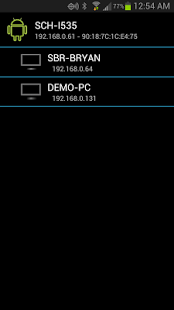
Take control of your Media Center PC with this Android application. This application allows your Android powered phone or tablet to act as a remote control for your media center PC. With the client software and Android App installed you will be able to do everything from surf the web, control your media, put the PC to sleep or wake it up and much, much more...
**** REQUIRES FREE SERVER SOFTWARE INSTALLED FROM BELOW ****
http://android.developersinfo.com/android-desktop-remote.aspx
*** Problems with mouse on HTC One ***
Sadly I do not have an HTC One to test with so I am unable to resolve the issue at this time. If anyone has a One they would like to donate to the cause then email support@developersinfo.com. This software is FREE so I cannot buy a device for testing.
Wake the PC up or put it to sleep. **** requires wake-on-lan supported device ****
Send quick launch icons directly to the client.
Touchpad mouse functionality with left / right click and scroll capability.
Custom media, browser and arrow keyboards.
------------------------------------------------------
Moving the mouse can be achieved by touching and moving your finger anywhere inside the mouse pad (section where the hand is pointing).
Left Click by tapping or "quick clicking" with one finger anywhere inside the mouse pad section.
Right Click by holding one finger on the mouse pad and tapping or "quick clicking" with another finger anywhere inside the mouse pad section.
Scrolling inside applications can be done by pressing and holding with your index finger, then with your middle finger touch and slide up or down.
Quick Launch applications which the server sends are located at the top bar. Click the icons controls applications on the server. You can also have the remote device sleep by pressing the power icon on the far left **** Windows Vista and above ****.
Keyboard input can be loaded by clicking the keyboard icon inside the launch bar or by using Android's built in menu button and selected "Standard Keys".
Extended Keys can be loaded by clicking Android's built in menu button and selected the desired keyboards. You should have built in shortcut keys for browser actions, media actions and arrow keys.
Settings for mouse speed, click speed and scrolling speed can be changed via the Android menu key from the server view of the app.
------------------------------------------------------
PERMISSIONS:
INTERNET - Needed for communicating with the server software. Only local communication is needed. No data is transmitted or received from anything other than the desktop software.
WIFI-STATE - Needed to check the IP and connectivity information so communication can be established with the server software.
About Android Desktop Remote Control
The company that develops Android Desktop Remote Control is developersinfo.com. The latest version released by its developer is 1.4.
To install Android Desktop Remote Control on your Android device, just click the green Continue To App button above to start the installation process. The app is listed on our website since 2013-10-08 and was downloaded 0 times. We have already checked if the download link is safe, however for your own protection we recommend that you scan the downloaded app with your antivirus. Your antivirus may detect the Android Desktop Remote Control as malware as malware if the download link to com.developersinfo.android.remote is broken.
How to install Android Desktop Remote Control on your Android device:
- Click on the Continue To App button on our website. This will redirect you to Google Play.
- Once the Android Desktop Remote Control is shown in the Google Play listing of your Android device, you can start its download and installation. Tap on the Install button located below the search bar and to the right of the app icon.
- A pop-up window with the permissions required by Android Desktop Remote Control will be shown. Click on Accept to continue the process.
- Android Desktop Remote Control will be downloaded onto your device, displaying a progress. Once the download completes, the installation will start and you'll get a notification after the installation is finished.
Program Details
System requirements
Download information
Pricing
Version History
version 1.4
posted on 2013-10-08
version 1.4
posted on 2013-01-20
Several fixes and updates
Disclaimer
External Download
We do not host Android Desktop Remote Control on our servers. We did not scan it for viruses, adware, spyware or other type of malware. This app is hosted by Galad and passed their terms and conditions to be listed there. We recommend caution when installing it.
The APK Download link for Android Desktop Remote Control is provided to you by apps112.com without any warranties, representations or guarantees of any kind, so access it at your own risk.
If you have questions regarding this particular app contact the publisher directly. For questions about the functionalities of apps112.com contact us.
